
Free Chrome extension for students & researchers
Understand any research paper, right on the page
Highlight a confusing sentence, formula or chart. ScholarLens explains it in plain language next to the text, so you stop copy-pasting paragraphs into a chatbot.
- Works on journal sites, arXiv, PubMed Central and most HTML papers
- Use Gemini (free tier), OpenAI or Claude with your own key
- No account, no middleman server
Effects of spaced retrieval practice on long-term retention
Participants in the retrieval condition outperformed controls after one week (d = 0.62, 95% CI [0.31, 0.93]), suggesting a moderate effect that persisted…
Cohen’s d = 0.62 means the retrieval group scored about 0.6 standard deviations higher than the control group, a medium-sized effect.
The 95% confidence interval [0.31, 0.93] does not include 0, so the improvement is unlikely to be due to chance.
How it works
Three steps, no tab switching
- 1
Add ScholarLens to Chrome
Install it from the Chrome Web Store, then paste an API key in Settings. Google AI Studio gives free Gemini keys in a minute.
- 2
Highlight what confuses you
Select text and press Alt+Shift+E, click the toolbar icon, or right-click. For formulas, tables and charts press Alt+Shift+S and drag over them.
- 3
Read, then dig deeper
The explanation streams into a panel beside the paper. Ask for something simpler, an example, more detail, or type your own follow-up question.
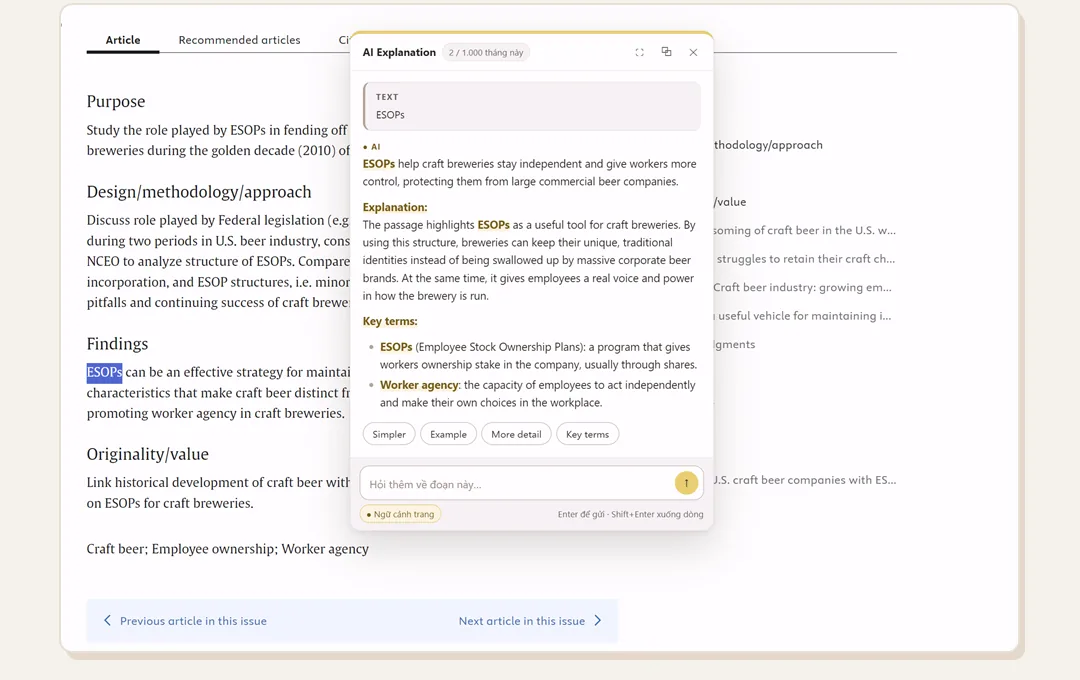
Context-aware explanations, not generic definitions
ScholarLens sends the paper title and the surrounding paragraph along with your selection, so the answer fits what the authors actually mean. Key terms are pulled out and defined, which makes the next paper easier too.
- Set your field and level (undergraduate, master’s, PhD)
- Plain English, or Vietnamese with English terms kept in brackets
- Follow-up chips: Simpler, Example, More detail, Literal translation
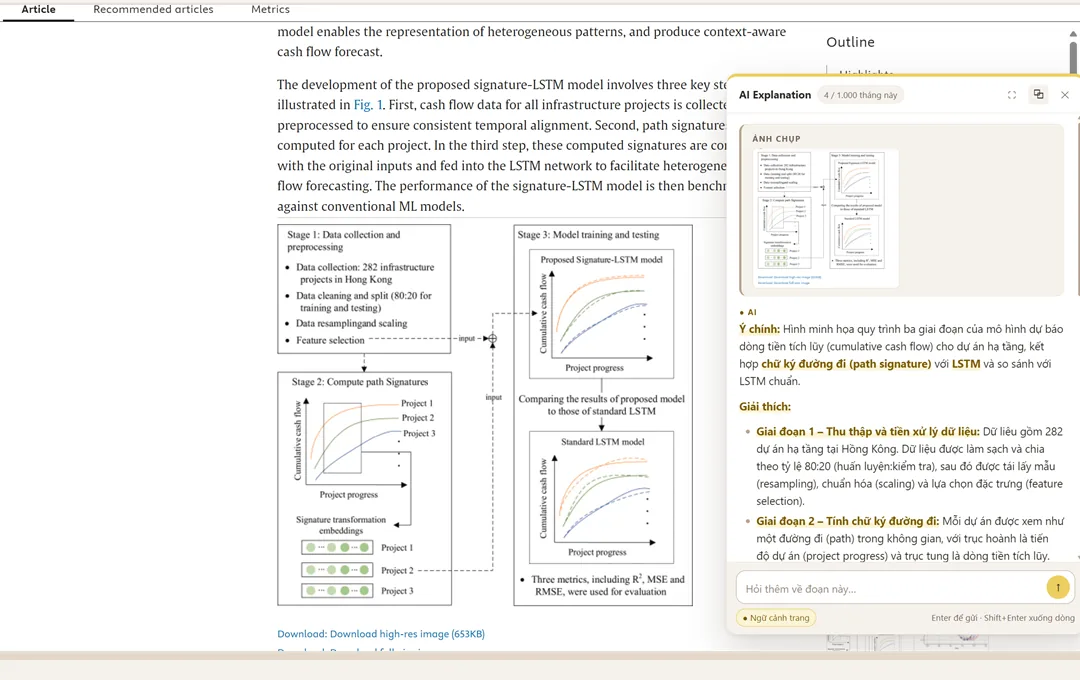
Formulas, tables and figures too
Equations and charts often can’t be copied as text. Drag a box around them and the AI reads the screenshot directly, then walks you through each part: what the symbols mean, what the axes show, and why it matters for the paper’s argument.
Try it on your next paperBuilt for people who read papers every week
Undergraduates
Get through assigned readings and literature for essays without stalling on jargon or statistics you haven’t covered yet.
Graduate students
Speed up literature reviews. Understand methods sections quickly and check what a model or test is really doing.
Researchers & professionals
Read outside your field with confidence: medicine, economics, psychology, engineering or machine learning.
Non-native English readers
Keep the original English terms while you learn them, with explanations in the language you think in.
Private by design
No ScholarLens server sits in the middle. Your selection goes straight to the AI provider you choose, and your key stays on your device.
Your choice of AI
Google Gemini, OpenAI and compatible services (OpenRouter, LM Studio) or Anthropic Claude, with an optional fallback model.
Frequently asked questions
Is ScholarLens free?
Yes. The extension is free to install. It uses your own API key from an AI provider; Google AI Studio offers Gemini keys with a free tier, so most students pay nothing.
Which AI providers does it support?
Google Gemini, OpenAI and OpenAI-compatible services (for example OpenRouter or a local model in LM Studio), and Anthropic Claude. You choose the provider and model in Settings.
Does it work with PDF files?
Not inside the browser’s built-in PDF viewer, because Chrome does not let extensions run there. Open the HTML version of the article, which most journals, arXiv and PubMed Central provide.
Can it explain formulas, tables and charts?
Yes. Press Alt+Shift+S and drag over the formula, table or figure. ScholarLens sends that screenshot to the AI, so it can explain content you cannot copy as text.
What language are the explanations in?
You can choose plain English, or Vietnamese with the English technical terms kept in brackets. You can also set your field of study and level so explanations match what you already know.
Is my data sent to your servers?
No. There is no ScholarLens server in the middle. The text or region you select goes straight from your browser to the AI provider you picked, and your API key is stored only on your device.
Your next paper will make more sense
Free to install. Works in Chrome and other Chromium browsers such as Edge and Brave.
Add ScholarLens to Chrome